Activate
Turn on the AI you already pay for.
- For
- Teams already on Oracle NetSuite, Salesforce, Sage Intacct, Microsoft Dynamics 365 Business Central, HubSpot, Odoo, ServiceNow, Kantata (Mavenlink), Certinia or Rootstock.
- Duration
- 1 to 2 weeks
Three offers, one path: we activate the AI you already pay for, build your Metric Registry of vetted numbers, and deploy an agent that answers only from them.
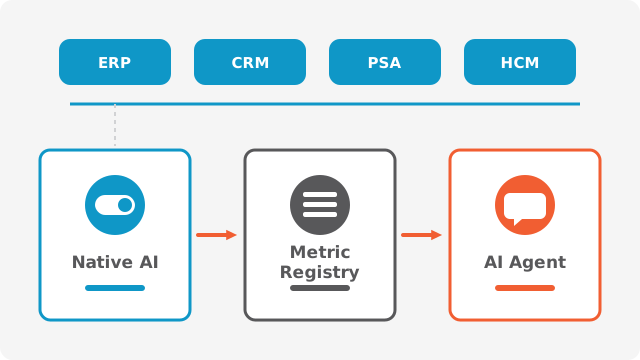
Big Bang is a cloud business systems consultancy founded in 2014, B Corp certified, with offices in Montreal, Toronto, Paris and Mauritius. In AI, Big Bang activates and configures the AI already built into the platforms it implements, such as Oracle NetSuite, Salesforce, Sage Intacct, Microsoft Dynamics 365 Business Central and HubSpot. Big Bang connects the assistant your team chooses, such as Claude (Anthropic), to those systems through the vendors’ governed MCP connectors. For agentic AI, Big Bang adds a Curation Layer: a registry of vetted metrics that the agent is bound to, deployed natively in your main platform or hosted across several systems.
Big Bang AI is organized in three offers that build on each other, and you can start at any level.
Turn on the AI you already pay for.

Your vetted metrics, owned by you, callable by any AI.

An agent that can only answer from your registry.
Each step builds the foundation for the next one.
You can enter at any level: some clients start with the registry, others with an agent on an existing registry.
AI should not rely on uncertain intuition but on certified business logic: the Curation Layer gives your agents a framework of truth you already trust.
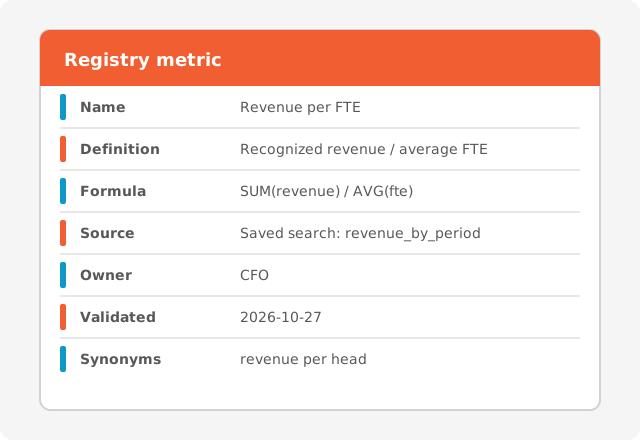
Each entry of the Metric Registry is a business definition, not a chart: here is what it contains.
| Name | Revenue per FTE |
|---|---|
| Definition | Recognized revenue over the period divided by the average number of full-time equivalents. |
| Formula | Recognized revenue / average FTE |
| Source | The saved search or query in the source system that returns each input. |
| Owner | The business leader accountable for the metric, for example the CFO. |
| Validation date | The date the owner last approved the definition and the result. |
| Synonyms | Revenue per head, revenue per employee. |
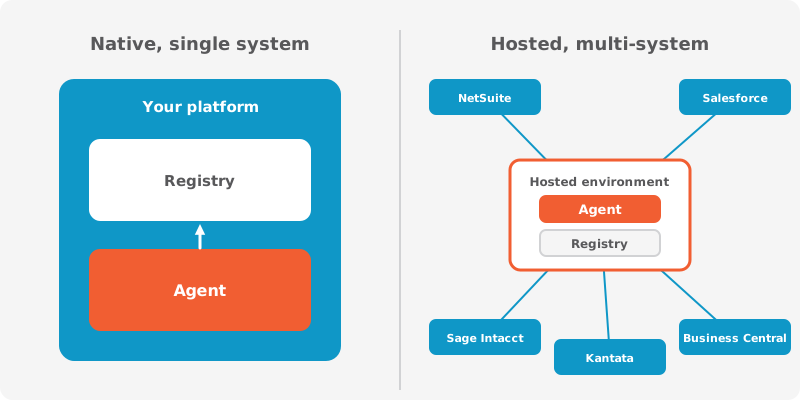
The registry and the agent run where your answers live.
If one platform holds the answers that matter (Oracle NetSuite, Salesforce, Microsoft Dynamics 365 Business Central), the agent runs inside it. The registry is stored as native records, and the agent inherits the platform’s security, permissions and audit logs.
If the answers span several systems, Big Bang hosts the agent and the registry on AWS, Azure or GCP, with governed connectors to each system. Connectors only run queries approved in the registry.
Big Bang activates the native AI of each platform it implements; each page lists the features, their status and what Big Bang does.





Also covered as part of the Salesforce ecosystem or as integrations: Certinia, Rootstock, Kantata (Mavenlink) and BambooHR. Their AI features are reviewed case by case.
Native AI activation puts the AI features included in your current platforms to work, and connects your assistant to your systems under clear rules.
For: Teams already on Oracle NetSuite, Salesforce, Sage Intacct, Microsoft Dynamics 365 Business Central, HubSpot, Odoo, ServiceNow, Kantata (Mavenlink), Certinia or Rootstock.
What it is not: No custom AI development and no metric registry: the registry is the Certify offer.
This offer builds your Metric Registry in one source system: 30 named metrics, each defined, owned and validated by the business.
For: Finance and operations leaders who want AI answers based on the numbers their team already trusts.
The Big Bang agent answers business questions only from your Metric Registry, through the Curation Layer, and shows where every number comes from.
For: Organizations that want an agent answering business questions with traceable, approved numbers.
Big Bang delivers AI with its seven-step method, starting from the finance foundation of GAB’S Pyramid®.
An inventory of your systems, data and AI features, and the questions the business needs answered.
Prioritized use cases and the list of metrics to register, with their owners.
Activated features, connected assistants, and registry entries with their queries.
Each metric checked against trusted reports and signed off by its owner.
Features, assistant or agent released to the teams, with access rules in place.
Training, an AI usage policy and adoption measurement.
A living registry: new metrics, revalidation and support through Big Bang &Co.
Big Bang does not write custom AI models. It works in two ways: it activates and configures the AI already included in your platforms (Oracle NetSuite, Salesforce, Sage Intacct, Microsoft Dynamics 365 Business Central, HubSpot, Odoo and others) and connects your assistant, such as Claude, through the vendors’ governed connectors. For agentic AI, it adds a Curation Layer: a registry of vetted metrics that the agent is bound to.
Native AI automates repetitive work such as invoice capture, document handling and data entry. It also drafts text, answers questions in natural language and flags anomalies. Big Bang configures these features to match your processes so that users find them where they already work.
Yes, within what each vendor allows. Big Bang configures prompts, agents and permissions in the platform, without heavy development. When a need goes beyond native features, the Metric Registry and the agentic AI offer take over.
It is, when it goes through the vendor’s governed connector. The assistant then sees only what the connected user is allowed to see, and actions are logged by the platform. Big Bang sets read-only access by default, defines which roles can connect, and documents the usage policy.
Expect less manual entry, faster answers to everyday questions and more consistent numbers across teams. Benefits depend on which features are activated and how widely they are adopted, which is why Native AI Activation includes adoption measurement.
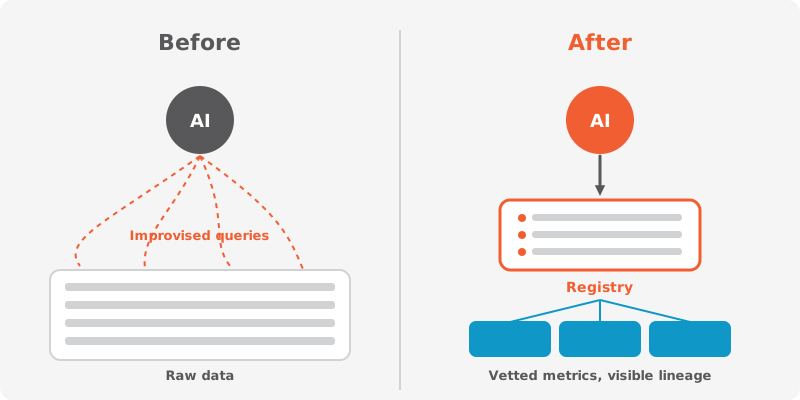
The Curation Layer is a governed layer between your business systems and an AI model. It makes the AI use vetted data and approved logic instead of improvising answers from raw rows. Its core is the Metric Registry.
Standard models lack the context of your own conventions and rewrite their queries every time. They ignore the reports your team already certified, so two sessions can return two different numbers. A registry-bound agent avoids this by reusing the same approved metric each time.
A Metric Registry is a durable asset listing every metric an agent is allowed to use. Each entry has a name, an owner, a formula and a verified query in your source system. The registry belongs to you and can be read by any AI.
Through explicit lineage. Every answer from a registry-bound agent can be traced through the approved query down to the transaction rows in the source system. A question the registry cannot answer is escalated to the metric owner.
The agent is deployed in one of two modes. In native mode, it runs inside your main platform and inherits its security and audit logs. In hosted mode, it runs on dedicated cloud infrastructure (AWS, Azure or GCP) and connects to several systems such as Salesforce, Kantata (Mavenlink) and Sage Intacct.
In hosted mode, the agent and the registry run on dedicated cloud infrastructure (AWS, Azure or GCP, in the region you choose). Connectors to your systems only execute queries approved in the registry, and the registry remains your asset. Big Bang documents data flows, access and retention before deployment.
Five minutes to see where you stand, then a conversation with an AI advisor about the right entry point.