Learn NetSuite Salesforce integration architecture, setup steps & best practices. Partner with BigBang, a trusted NetSuite integration service provider.
In modern enterprises, CRM and ERP systems must operate as a unified ecosystem—not isolated platforms. Integrating Salesforce with Oracle NetSuite enables businesses to streamline operations, eliminate data silos, and accelerate revenue cycles. A well-executed NetSuite Salesforce integration connects front-office sales activities with back-office financial and operational workflows creating a seamless lead-to-cash lifecycle. For enterprises working with a NetSuite ERP consultant or NetSuite integration service provider, this integration is a critical step toward digital transformation.
NetSuite Salesforce integration is the process of synchronizing data and workflows between CRM and ERP systems to ensure real-time visibility and operational efficiency.
Modern integrations (via iPaaS platforms like Celigo integrator.io) enable automated, near real-time data exchange across systems.
Combining CRM and ERP data creates a 360° view of customers—improving decision-making and personalization.
Automates the journey from opportunity → order → invoice → payment.
Eliminates manual data entry and duplication.
Sales teams gain visibility into billing and fulfillment; finance teams access pipeline insights.
Integration platforms support high-volume data processing and enterprise scalability.
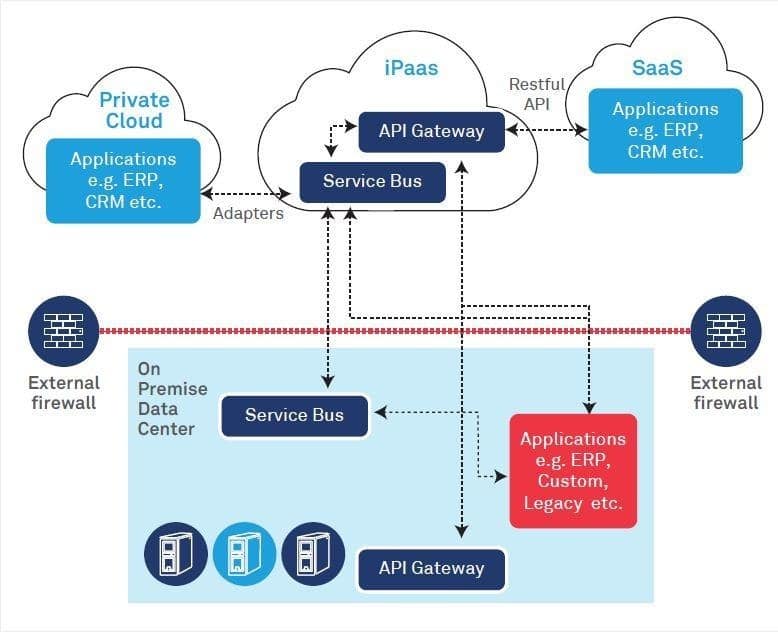
A robust architecture ensures scalability, reliability, and security. 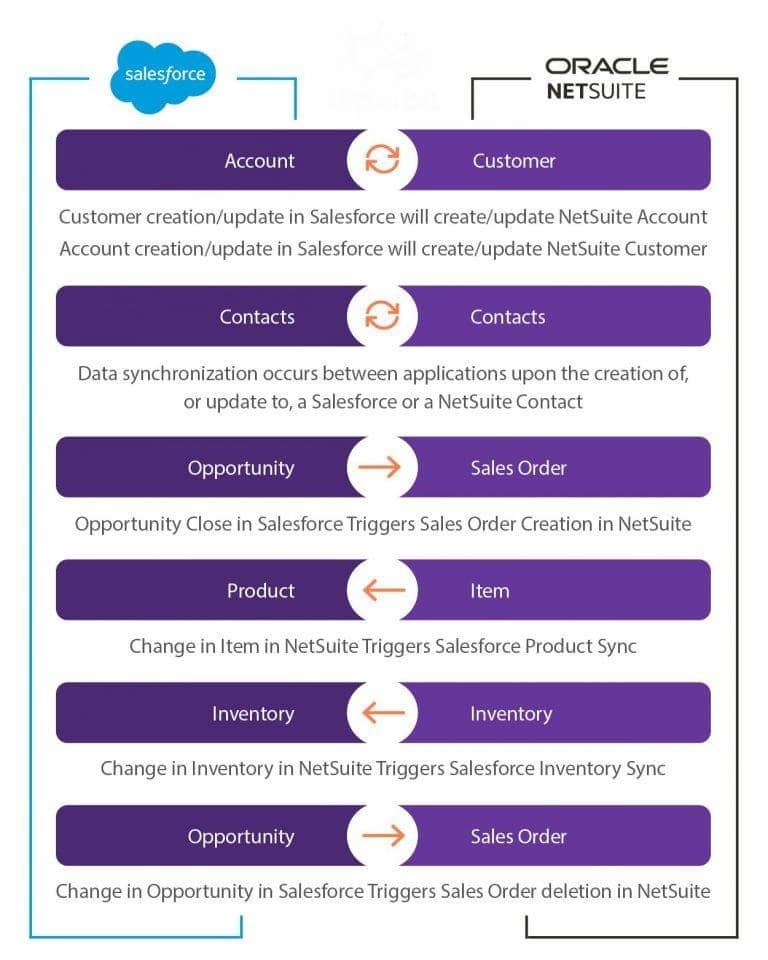
Avoid conflicts by assigning system-of-record (CRM vs ERP).
Ensure consistent field formats and naming conventions.
Accelerate deployment and reduce complexity
Choose architecture that supports future growth
As a NetSuite Oracle solutions consultant and NetSuite integration service provider, BigBang delivers:
A well-designed NetSuite Salesforce integration is not just a technical upgrade—it’s a strategic enabler for growth. By aligning CRM and ERP systems, businesses unlock efficiency, accuracy, and real-time insights across the entire revenue lifecycle. For organizations aiming to scale operations and improve cross-functional collaboration, partnering with an experienced NetSuite integration service provider like BigBang ensures a future-ready, high-performance integration framework.
1. What is NetSuite Salesforce integration? It is the process of connecting Salesforce CRM with NetSuite ERP to synchronize data and automate workflows. 2. Which integration method is best? iPaaS platforms are preferred for most businesses due to flexibility, scalability, and faster deployment. 3. Can integration be done without coding? Yes, no-code/low-code platforms like Celigo enable integration without heavy development. 4. How long does integration take? Depending on complexity, it can take from a few weeks to several months. 5. What are the main challenges?
6. Is real-time synchronization possible? Yes, modern integration platforms support near real-time data sync. 7. What data is typically integrated? Accounts, contacts, opportunities, orders, invoices, and financial data. 8. Do I need a NetSuite ERP consultant? Yes, working with a certified consultant ensures proper architecture, scalability, and compliance.
Get a free assessment from our cloud experts and map out your roadmap.
Get my free assessment