Explore Celigo integrator.io features, benefits & use cases. BigBang helps businesses automate CRM, ERP & marketing workflows efficiently.
As businesses scale, managing multiple systems CRM, ERP, marketing automation platforms, and ecommerce tools becomes increasingly complex. Data gets scattered, processes slow down, and teams struggle with inefficiencies. This is where Celigo integrator.io comes in. It acts as a bridge between your applications, enabling seamless data flow and automation across systems without heavy coding or complex infrastructure. For organizations working with a NetSuite ERP consultant or exploring CRM automation, Celigo offers a practical and scalable integration solution.
Celigo integrator.io is a cloud-based integration platform (iPaaS) designed to connect applications and automate workflows across your business ecosystem. Think of it as a centralized hub where:
…all communicate and sync data automatically. Instead of manual data entry or disconnected systems, Celigo enables smooth, real-time data exchange.
At its core, Celigo uses something called “integration flows.”
For example:
These flows eliminate repetitive manual tasks and reduce errors.
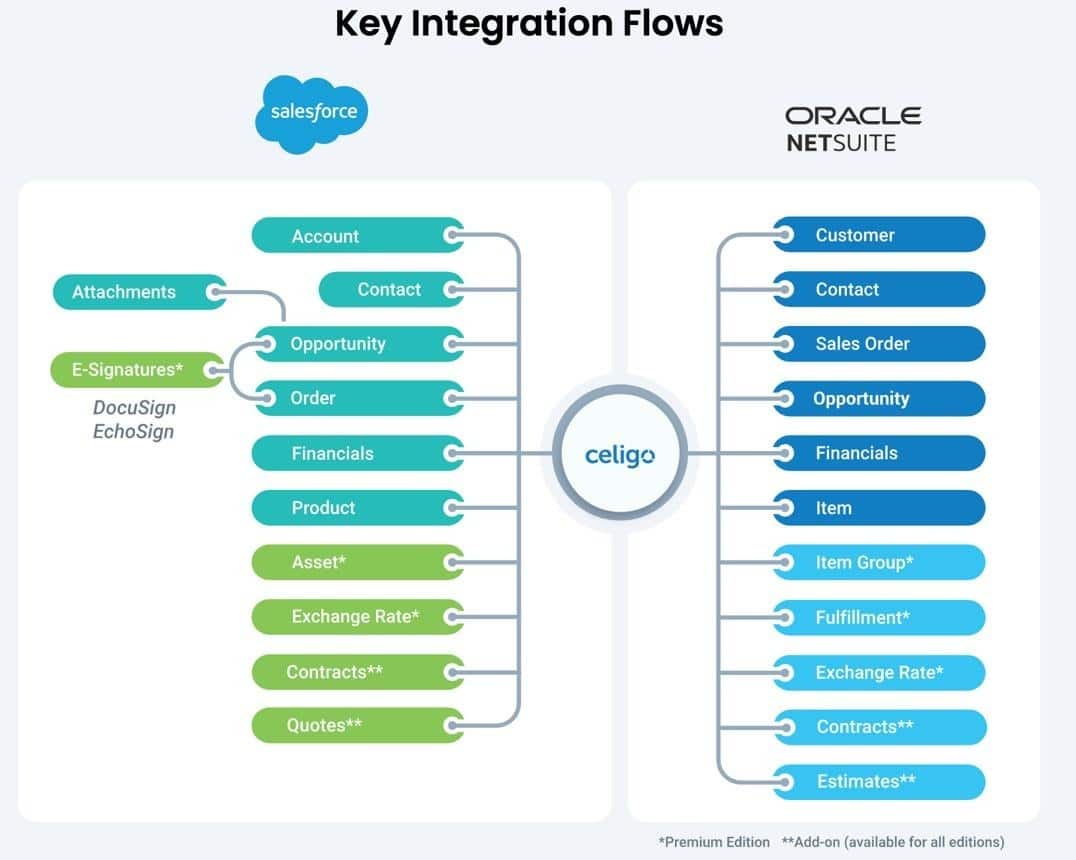
Celigo provides hundreds of ready-to-use connectors for popular apps like NetSuite, Salesforce, Shopify, and more. This means faster implementation with minimal setup.
You don’t need deep technical expertise. The drag-and-drop builder allows both business and IT teams to create integrations easily.
Celigo automates business processes such as:
It acts as a powerful automation platform for end-to-end workflows.
Supports both:
Celigo allows you to:
Ensuring compatibility across platforms.
You can manage APIs, monitor integrations, and control data flow centrally making it ideal for scaling businesses.
Some systems can even auto-resolve most integration errors.
Celigo is evolving with AI capabilities for:
This helps reduce dependency on technical teams.
Prebuilt templates significantly reduce development time. This allows teams to deploy integrations quickly without long development cycles. It also accelerates time-to-value for new systems and workflows.
Automation eliminates repetitive tasks and human errors. Teams no longer need to manage duplicate data entry across systems. This improves efficiency and reduces operational bottlenecks.
Data is synced automatically, ensuring consistency across systems. It minimizes discrepancies between CRM, ERP, and other platforms. This leads to more reliable reporting and decision-making.
Teams spend less time on operations and more on strategy. With automated workflows, employees can focus on growth-driven activities. It also improves cross-team collaboration with shared data visibility.
Celigo grows with your business supporting more apps and workflows over time. It can handle increasing data volumes and integration complexity. This makes it ideal for businesses planning long-term expansion.
Avoids heavy custom development and long-term maintenance costs. Reduces dependency on large development teams and infrastructure. This results in better ROI compared to custom-built integrations.
Celigo is widely used for:
It’s especially valuable for businesses working with a NetSuite CRM consultant or looking to streamline cross-platform operations.
Celigo is a strong fit if:
However, for highly complex enterprise integrations, advanced customization may still require expert support.
As a trusted NetSuite ERP consultant and NetSuite integration service provider, BigBang helps businesses:
For businesses aiming to streamline operations, Celigo integrator.io offers a practical, scalable, and efficient way to connect systems and automate workflows. Whether you’re managing a marketing automation platform, implementing CRM automation, or working with a NetSuite ERP consultant, Celigo provides the foundation for a truly connected digital ecosystem. If your goal is to eliminate silos and scale efficiently, investing in the right integration strategy with the right partner makes all the difference.
1. What is Celigo integrator.io used for? It is used to connect applications and automate workflows across systems like CRM, ERP, and marketing platforms. 2. Is Celigo suitable for beginners? Yes, its low-code interface and prebuilt templates make it beginner-friendly. 3. Does Celigo require coding? No, but advanced use cases may require some scripting. 4. What systems can Celigo integrate? It supports CRM, ERP, ecommerce, databases, APIs, and more over hundreds of applications. 5. Is Celigo a CRM or ERP platform? No, it is an integration platform that connects CRM, ERP, and other systems. 6. Can Celigo handle real-time data? Yes, it supports both real-time and batch data synchronization 7. What are the limitations?
Get a free assessment from our cloud experts and map out your roadmap.
Get my free assessment